



With the increasing availability of low-code and no-code platforms for building applications, businesses now have the options to create their applications with minimal coding. SugarCRM has long offered a no-code/low-code platform. The SugarCRM administration includes Developer Tools such as Studio and Module Building, which facilitate the creation of custom modules distinct from standard ones.
SugarCRM is a platform to extend CRM functionality
As part of SugarCRM, business users have access to a standard module that allows sales teams and service teams to record their activities and processes. However, not all companies adhere to the same sales data models and processes. SugarCRM offers several tools to modify the existing Sugar functionality and expand its capabilities.

SugarCRM Developer Studio
Sugar Developer Studio is just one of the various built-in development tools available to users with administration and developer rights. This platform empowers administrators and developers to customize standard modules and their respective fields. It also provides functionality to modify module layouts and mobile layouts for both standard and custom modules.
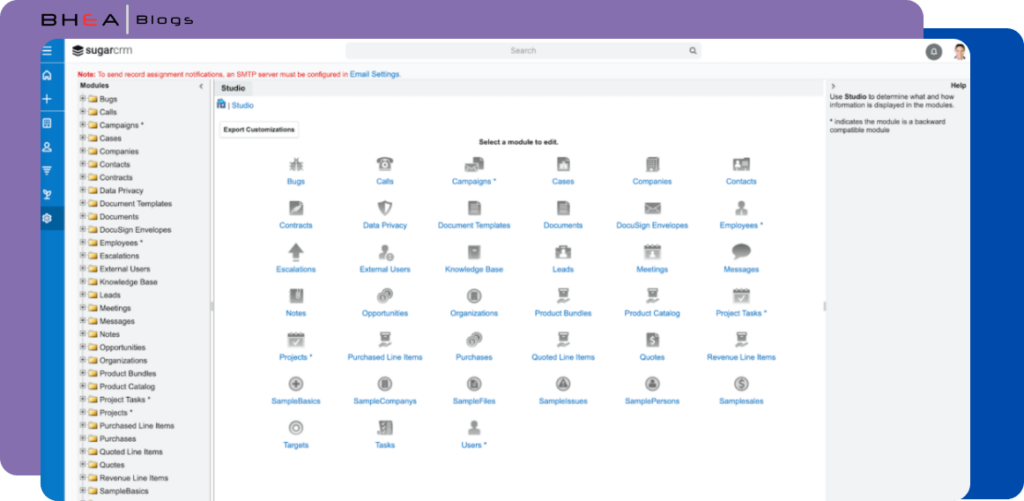
Before delving into the other developer tool Module Builder,, a SugarCRM developer or SugarCRM Administrator, interested in building a custom module should first familiarize themselves with Studio.
SugarCRM Module Builder
While Sugar Developer Studio enables the customization of standard and custom modules, Module Builder facilitates the creation of new custom modules essential to CRM Implementation.

Sugar CRM Administrators and Developers with appropriate access rights can build and deploy custom modules within the SugarCRM instance.
Why do you need a custom module in SugarCRM?
During CRM implementation, Sugar Partners like us often encounter scenarios where SugarCRM’s standard modules require more or less information than the standard module allows. Sugar Developer studio allows you to change the fields or remove the fields or add the fields. In some cases, an entirely new set of fields need to be captured, which cannot be accommodated in standard modules.
For instance, we recently worked with a business that deals with unique high value products not commonly found in the market. They wanted to incorporate a simple Order Management feature, which was previously managed using Excel sheets. Instead of recommending the continued use of Excel sheets, we created a simple Orders module using Module Builder and deployed it.
In another scenario, a company generated invoices for their sales using an ERP system. However the accounting team often required the sales team to be informed about overdue invoices and follow up with the customer. To address this, we created an invoice module and integrated it to bring the overdue invoice to SugarCRM, allowing the sales team to easily follow up.
To improve productivity, during CRM implementation, we identified the need to develop custom modules in SugarCRM, which has improved the productivity of the team.
How to create a custom module in SugarCRM?
It is easy to create a custom module in SugarCRM, however to ensure nothing goes wrong, you need to first create this in your sandbox environment before experimenting or developing on the production environment. If you are yet to receive your sandbox environment, either you contact your Sugar Partner or raise a ticket with Sugar support portal support.sugarcrm.com.
We also recommend you to go through Sugar Administration videos or training programs conducted by SugarCRM or by Bhea before taking a very active custom module development.
Step 1 – Identifying information and Creating Data Models
In the initial step, start by identifying the specific information to be captured within the module. Next, prepare the Data Model by specifying the types of fields needed to collect data from the users. Typical data types include Text, Text Area, Numbers, Currency, and Drop Down Values etc.
For instance, when capturing Orders Information, the module should be equipped to capture the details such as:
- Order ID : Generated ID Text Fields
- Order Date : Date Field
- Order Value : Currency Field and so on.
SugarCRM offers the flexibility to create fields with a wide variety of data types, providing ample options for customization.
Step 2 : Selecting the Module Types in SugarCRM
In the second step, you need to identify the type of Module you wish to create. SugarCRM’s module builder provides the options to create various types of modules, including Basic, Company, Person, Sale, Issue and File.
The selection of module type should align with the specific information you intend to capture within the module. Each module type triggers the generation of certain minimum fields by the system. For instance, the orders module mentioned in the previous example is akin to the Sale module.
Step 3 : Creating Packages and Modules in Module Builder
As part of Step 3, in the Module Builder, you start by creating a package. Provide the package name and assign a unique key to it, then save the package.

Once the package is saved, you can proceed to create the module. These actions collectively result in the creation of the package with the desired modules.

After creating the module, you have the option to deploy the module within the instance where the package was created. Alternatively, you can export the package and deploy it in any other instance where you require the module.
Step 4 : Customizing Modules and Configuring Layouts in Sugar Developer Studio
In Step 4, after the custom module has been deployed in the instance, it becomes available for editing in the Sugar Developer Studio. Access the studio and open the newly deployed custom module to add the required fields. A variety of fields can be create and deployed within the module.
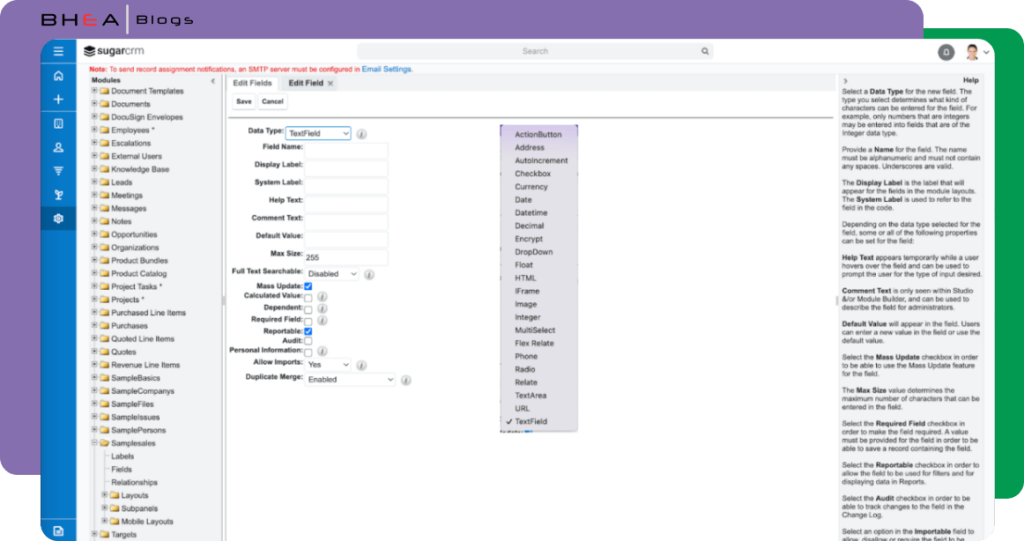
After adding all the fields in the Studio, it’s essential to navigate to each layout and incorporate the field into the layout. This ensures that the fields are visible when accessed by the users.
Step 5 : Configuring Fields in the Layouts
In Step 5, Sugar provides the flexibility to edit the layout using a drag-and-drop mechanism, which can be extended to various layout such as Record View, List View, Mobile View, and more.
Once these fields are properly configured using the no-code/low-code developer studio, the new custom module is ready for use.
Conclusion
In a nutshell, if you want to build a new custom module in SugarCRM, you do not need a programmer to add instead a tech savvy SugarCRM Administrator or Sugar Developer can quickly build this and deploy it.
If you are still confident of adding the new module, we can assist you in adding the custom feature. Please contact us for a quick discussion to understand what your current CRM customization needs are. Bhea is a leading SugarCRM solution provider and an official partner of SugarCRM since 2007.
Contact us through our website: https://www.bhea.com/contact-us


